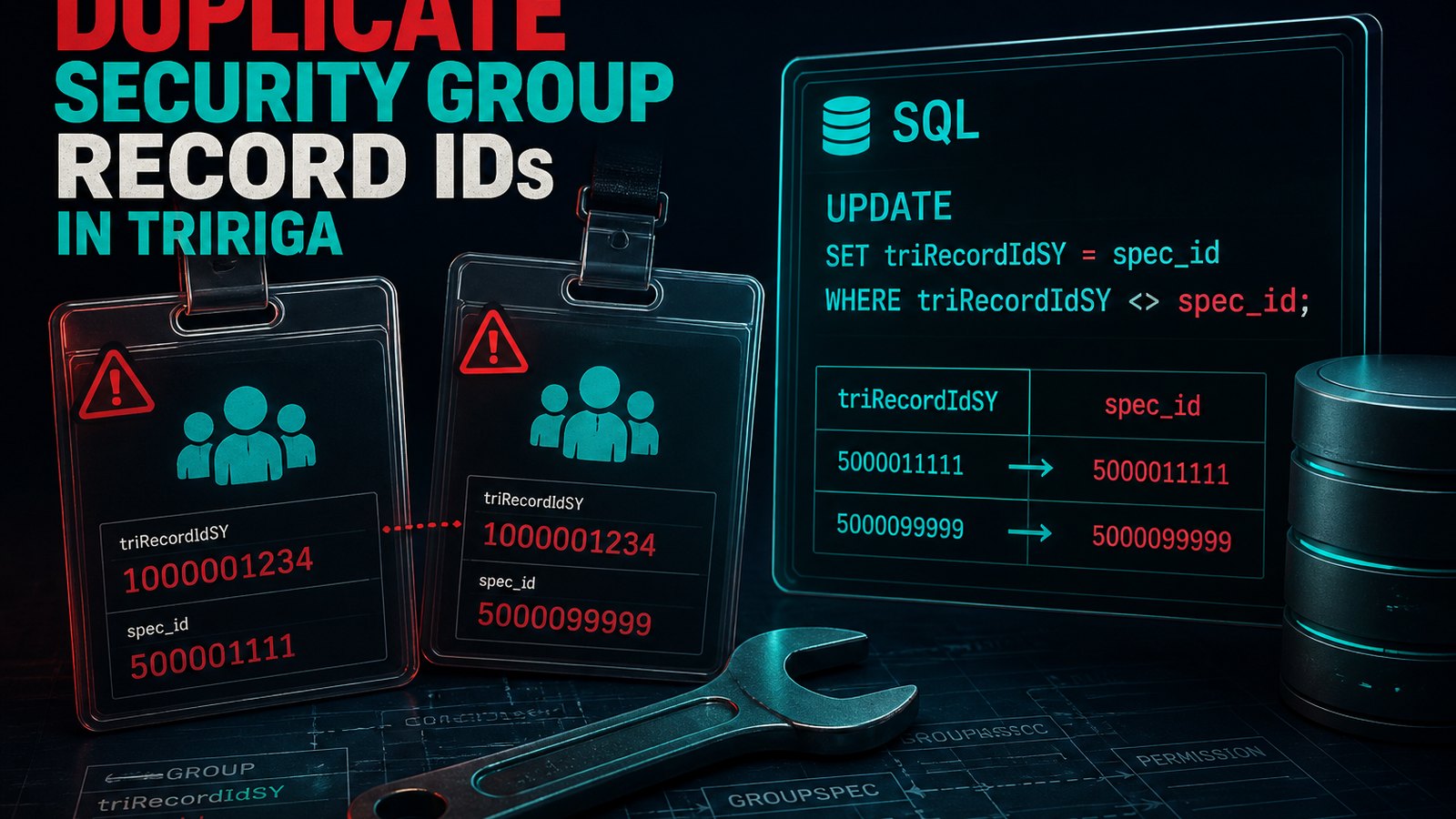
My current client has been using TRIRIGA for about 20 years now. As you would expect over such a long period of time, some things get out of synch. My customer brought a concern to me that they couldn't get a good grasp on which people were actually in which group. If they checked from the triPeople object they'd get one count, if they checked from the My Profile object they'd get another count, and finally if they checked the member list on the group they'd get another count. My task was to bring these in to synch so that they could have accurate roles and counts.
We've got multiple objects at play here so it was important to understand what are the objects and what is the normal flow of information in those objects if you made changes in the user interface. This needed to be understood clearly first because the patch helper workflow would need to mimic that process. The people record has associations to Group Detail records and My Profile Records, the My Profile record has associations to the People record, to Group Detail records, and also to Groups. The Group record has associations to My Profile records.
I decided to break the work up in to a few different tasks. The first task was going to be to ensure that all of the My Profile records that were associated to a Group also had an association from the Group back to the My Profile record. I started here because it is the existence of the My Profile record that allows a user to log in to TRIRIGA, The second task would be to make sure that on the People record there was an associated Group Detail record that matched the associated Group records of the My Profile record. In the user interface the Group Detail records flow from the People Record to the My Profile record. If I bring them in to alignment on the people record and activate the record then the associated Group Detail records associated to the My Profile record would be updated accordingly.
For my first task to bring the My Profile and Group records in to alignment I wrote a patch helper workflow that would get all of the My Profile records that had an association to a group, and all of the My Profile records associated from a group. This would ensure that I had the complete set of My Profile records regardless from which object the association existed. Additionally it would get all of the Group records that had an association to or from a My Profile Record. This would allow me to just iterate the Groups that are actually in use. Once I had a handle on the set of My Profile records, I would then iterate through each group record and add an association from that Group to the My Profile record if it was missing or add the association from the My Profile to the Group if that was missing.
When checking to see if the My Profile record had an association to the current Group I was iterating, I'd have to retrieve all of the associated groups, and then match it to the one I was iterating. To do this I decided to use the triRecordIdSY field to filter on since that field corresponds to the SPEC_ID of the record which means it should be unique.
Once I was finished writing all of the workflow logic and was happy with it, I did a test on a single security group. Everything worked the way it should and things were brought in to alignment for that group. Feeling confident, I removed the hard coded Group Name from the query that was retrieving group records so that it could get all groups and allow the processing of the in use groups. I executed the workflow again so that it could update all groups. When it finished I started doing validations and I discovered several errors. For a few groups, there were failures.
I put back in place the Group filter in the Group Query and set it to one of the failing Groups. I turned on workflow instance and ran it again. To my surprise my query task that was getting the associated groups to a My Profile record and filtering on the triRecordIdSY of the Group record returned multiple groups. I was baffled at first as this should not be possible. I couldn't think of any scenario where it would be possible to return more than one record. I double checked the task settings and everything was correct. Still not sure what the issue was I decided to add more logging. I turned on the Query logging so I could see the actual SQL that was being executed.
I ran the workflow again. Again it failed returning multiple Group records instead of just one. I downloaded the server.log file and found the sql that was being executed. I copied it and ran it directly against the database. It returned multiple records. I adjusted the sql to include the triRecordIdSY field as a result column and executed the SQL query against the database again. There it was plain as day. Multiple security group records had the same triRecordIdSY value. This is a system generated and populated value so how could it be off? In the customer environment I found a few different sets of Group records that had the same triRecordIdSY values.
Fortunately, I have my own VMs of OOTB versions of TRIRIGA, so I fired up my 11.6/5.0 clean install of TRIRIGA and executed the following SQL:
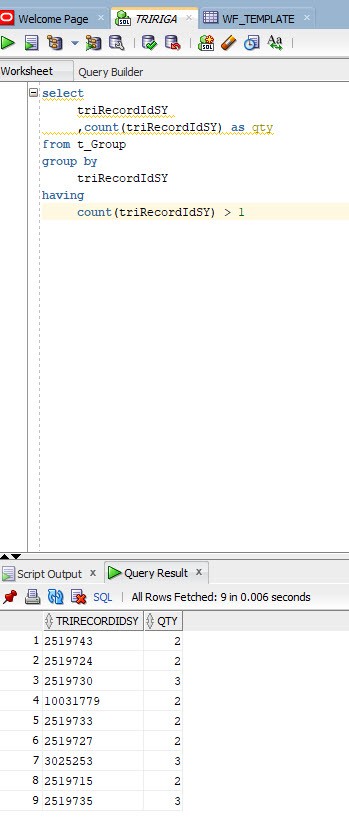
As you can see in 11.6/5.0 OOTB there is quite a bit of duplication. Here is the list of the groups. You are probably wondering how this could happen. I know I was at first. Let me show you the group names ordered by the Id and then you will better understand.
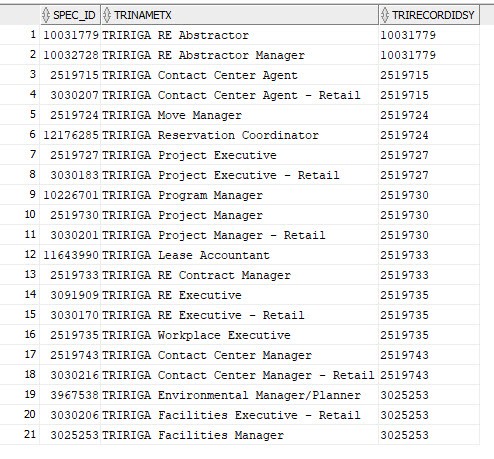
To me how it happened is obvious. The groups were copied. By looking at the Spec_Id you can tell which Group was the source and which is the copy. I've been doing TRIRIGA development for about 17 years now and I remember a time when you used to see the system fields in the workflow mapping. Also workflow mapping would default to mapping every field on the source to the matching field on the target. You had to clear it and then set the mappings to what you wanted. My guess is these groups were copied at a time when that functionality is possible. Therefore the triRecordIdSY field would be overwritten by the source value. So once upon a time the copy workflow for groups had errors in it, in that it was mapping everything instead of just the desired fields.
This was impacting some custom security groups for my client. Remember how I said they've been using TRIRIGA for about 20 years? Obviously some of these groups were copied when that defect existed.
Now we know what the problem is, how it likely happened, the only thing left is how do we fix it? The offending fields are system fields that are populated by the system at record creation. You cant update them via workflow. There are only two choices. You copy the group with invalid triRecordIdSY, ensure it has the correct members, and then update all the user records to use the new group, and then delete the bad group. That is a ton of impact so I chose the easier option of updating the values directly in the database with SQL.
update t_group set triRecordIdSY = spec_id where triRecordIdSY != spec_id;
I could not think of any risks to updating the records with SQL, so doing that was much less impact than the first choice. I did validate that copying a security group in 11.6/5.0 does not duplicate the triRecordIdSY field value in to the copied group. That defect has long since been fixed.
Once I updated the group records in the database, I was then able to go back to my workflow and run it. All of the groups that were failing and not coming in to sync now were updated correctly. Task 1 was complete, My Profile record and Group records were now in sync.
Task 2 was pretty straight forward, for every people record that had an associated My Profile record, I would iterate the groups on the My Profile record and then add any group details records for any missing groups. I also would remove any group detail records that didn't have a corresponding association to a group on the My Profile record. I used the OOTB box process to get this to flow to the My Profile record. I'd start by revising the People records, fix the Group Detail records, and then activate the People record. The Group Detail records would flow form the People record to the My Profile Record. When I was finished, everything was in synch.
All in all the exercise was more interesting and more challenging than I had initially expected. I hope you find this information useful, and thanks for reading it to the end.
Comments (0)
No comments yet.
Sign in to comment.