In my TRIRIGA work history I've always been able to rely on someone else to perform integrations. Back at TRIRIGA prior to the IBM acquisition there was a separate group that worked on integrations. As a developer I was able to focus on everything else. The acquisition by IBM didn't change things as that group was now part of IBM GBS. Even my post IBM experience working for a IBM business partner, the company hired people as integration specialists. Even though there was an integration specialist, I actually did learn some basics of the first version of Integration Object in my last position. I enjoy learning new things and I'm eternally curious so I took the opportunity to load some DTO's (Data Transfer Objects) via Integration Object instead of Data Integrator.
It's now been a few years since that time and I find myself facing a much more complicated integration. Unfortunately, in my current position I don't have an integration specialist to turn the work over to. It was time to learn more about Integration Object. I imagine I started off just as anyone else would by searching out and reading all of the documentation I could find on Integration Object. The documentation is actually pretty good. However, there were some pitfalls I fell in to that I had to get out of. Let me tell you my story.
My task seemed relatively easy. I had to pull in data from an external database on a daily basis. I broke my task up in to small pieces in order to have some mile stones to measure my progress as well as make it easier for me. Since I only needed to learn small pieces of functionality at a time I was less likely to get lost and confused trying to understand the whole process at once.
My first task was to simply be able to connect to an external database. From reading the manuals I knew that were going to be some columns in the table that Integration Object needs to exist in order for it to do its job. Unfortunately the external database that I needed to pull information from wasn't going to work as I did not have the ability or permission to add the additional columns. My only choice at this point was to create a special staging table inside of the TRIRIGA application's schema so that I could have the columns required by Integration Object. I created the table and inserted some test data for later testing. I then had to create a database connection string for MS-SQL server since the existing samples don't cover SQL Server. I test the database connection and it was successful so my first step was finished.
My second step was to setup the data map of what columns in the database mapped to what fields on my business object. Here is where I ran in to my first big issue. I was using Internet Explorer 11 browser with TRIRIGA platform version 3.4.0 and I was able to select the module, BO, and form but no fields would show on the Integration Object record so that I could do the data mapping. I searched and searched and could not find an answer as to what I was doing wrong. I reached out to my network and asked if others had run in to that issue. Fortunately one of my friends told me to try using Google Chrome as he seemed to remember running in to the issue before. Fortunately switching to Chrome fixed the issue and I was able to do the data mapping.
My third step was to test the integration and verify that my journal record was created or updated in TRIRIGA and that the proper fields were in deed populated with the correct values. I clicked the execute button and waited a few moments for the Integration Object to process. The test run was successful and the proper record was created and populated. Additional testing of the update process was also successful.
At this point I was feeling pretty good about myself and was pleased with my progress. I could at least show the customer that if they populate the staging table with the proper data I can get it in to the proper records in TRIRIGA. I figured the hard part was done now I just needed to get it to run every day. To my surprise there was no built in method to schedule an integration. So it was back to research mode to find out my options for getting this job scheduled. During my research I discovered that an integration object job can actually be called from a batch file with a specifically crafted URL. So all I really needed to do was create a batch file with the proper URL in it and then just use the windows scheduler on the server to execute the batch file every day. This would technically meet the requirements of my integration but I wanted a better way, a way that could be done solely in TRIRIGA.
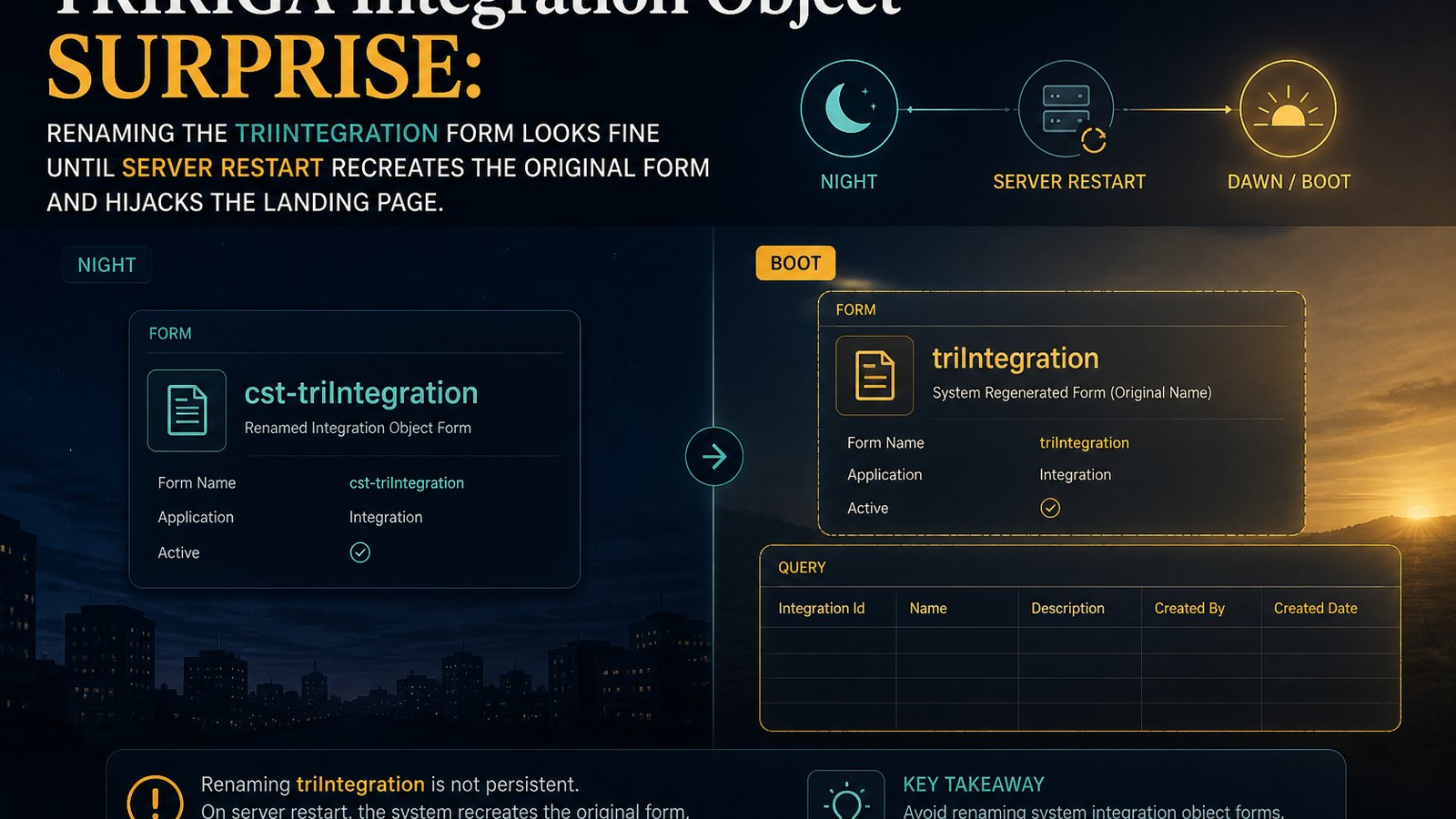
There are already several areas within TRIRIGA where scheduling takes place utilizing the Schedule Task. I decided that I would go ahead and use that functionality to schedule my Integration Object job. Well to do this I needed to customize the form used by Integration Object. The Integration Object is the triIntegration BO and Form in the triIntegration module. So being the stickler that I am for naming conventions, I properly renamed the triIntegration form to cst-triIntegration. I did all of my customization and did a test with a single occurrence. Everything worked correctly and the Integration Object job executed at the scheduled time. It was the end of the day and I felt great, my integration could now be scheduled and all I needed to do was some simple cleanup, but that could wait until tomorrow.
The next morning I logged in to TRIRIGA to finish my cleanup on the Integration Object Scheduling and navigated to the Integration Object landing page. To my shock, not a single Integration Object record displayed in the query when there should have been around thirty of them since there are twenty nine that ship with this version of the platform and I had created one. After a moment of panic, I quickly went in to the navigation builder and opened the menu and dug down to the nav item that displays the Integration Object query. I got the query name and then looked it up in the report manager tool. I executed the query from the report manager and low and behold all of my records were there.
The panic subsided once I saw the records were still there. I just needed to figure out why they were not showing up in the query. I figured it had to be some sort of filter or something. Checking the query quickly ruled that out as there were no filters on the query, not user, system, or advanced. I refreshed the landing page query and still no records. I clicked the add action and added a new test record. The new record then showed up on the landing page, and when I directly executed the query thirty one records showed up. All of the originals, my integration, and the test record. I opened the test record and was further surprised to see that none of the customizations I had made to the form were there.
At this point I figured I must have entered the Twilight Zone. I opened up the form in the form builder tool and the customizations were still there. Checked my integration record and the changes were there, checked the test record and the changes weren't there. I was stumped. I was lost and the next few hours of trying to figure it out wasn't productive either. I thought for sure I must have must have messed up the environment some how and was going to have to restore it from a backup. After thinking back through all of my TRIRIGA experience I got an idea of something to try.
Many years ago when I was doing a Facility Assessment build out I ran in to an issue where following naming convention broke functionality. There is a workflow that calls some custom java code that has a hard coded reference to the triConditionAssessmentWorkTask form. Well I had modified that form and thus to follow naming convention I renamed the form to cst-triConditionAssessmentWorkTask. Well that caused the custom java code to break and the workflow to not process correctly. It took me several hours to identify the source of the problem and the cause has stuck with me. I wondered if perhaps this might be another area where there might be some custom java code that gets broken when you rename the triIntegration form.
I went to the form builder tool and revised the cst-triIntegration form. I changed the name back to triIntegration and attempted to save the form. Instead of saving I received an error that a form with that name already exists. How could that be, I thought to myself. I renamed the original form, I didn't create a new one. Scanning further down the form list, sure enough there was a triIntegration form. I didn't create and had no idea where it came from but the fact that it was there told me that it wasn't could that I renamed the original. So I changed the name of the newly created one and then renamed the customized one back to the original name of triIntegration. I browsed to the Integration Object landing page and still no records other than the one test record I had created.
I was secretly wishing that changing the form name back would have fixed everything. It didn't. This required me to go and take another look at the navigation item. Sure enough the navigation item was pointing to the now renamed newly created form and not the customized form being renamed back to it's original. So somehow a new triIntegration form was created and the navigation item was modified to point to that new form. Now that I understood what was happening it was a matter of figuring out why it was happening. The day before I was able to rename the original form do all kinds of testing and never had an issue. So what changed from that day to the current one?
When I remoted in to the server and connected to the database as part of my testing earlier I realized the query windows I had created and had my SQL were gone. So the server had been restarted. It turned out that after hours the previous evening the IT group pushed out updates and rebooted the server. So somehow the creation of the new triIntegration form and the setting of the nav item to point to that new form must take place during system startup.
To put my hypothesis to the test I once again renamed the triIntegration form back to cst-triIntegration and then made sure that the nav item was indeed point to that form. Once I was satisfied I stopped and then restarted the websphere service in order to restart TRIRIGA. After the system came back up fully online I logged in and went to the Integration Object landing page. Sure enough no records. I then went to the form builder tool and the triIntegration module. There was a brand new triIntegration form. Inspection of the nav item also showed that it was pointing to this new triIntegration form. The source of the issue was now known. There is some sort of mechanism during system startup that checks to see if the triIntegration form exists. If it does not exist, it creates a new one and then sets the nav item to point to that new form.
My lesson learned is that now I need to remember two forms that can't be renamed as per proper naming convention. This also highlights the need for IBM to find a different mechanism to identify objects by. It's just very poor programming practice to hard code a value that can change. If the form name is going to be hard coded then the system should prevent it from being changed.
Have you discovered any surprising TRIRIGA behavior? Let me know.
Comments (0)
No comments yet.
Sign in to comment.