Out Of The Box Status Change Notifications
Just about every module in TRIRIGA has a module level workflow that handles status change notifications. The workflow is named in the following format: Module - Associate - triStatus - Create Notification Details . In order for a notification to be sent there are two requirements that must be met.
The first requirement is that a Notification Content record needs to be created. The notification content record needs to have the desired message to be sent. There is one limit upon the notification content record and that is that the substitution variables are limited due to being hard coded in the workflow triNotificationDetails - Synchronous - Trigger Notification Process which is located in the triRouting module and triNotificationDetails business object (BO). Below is the substitution mapping:
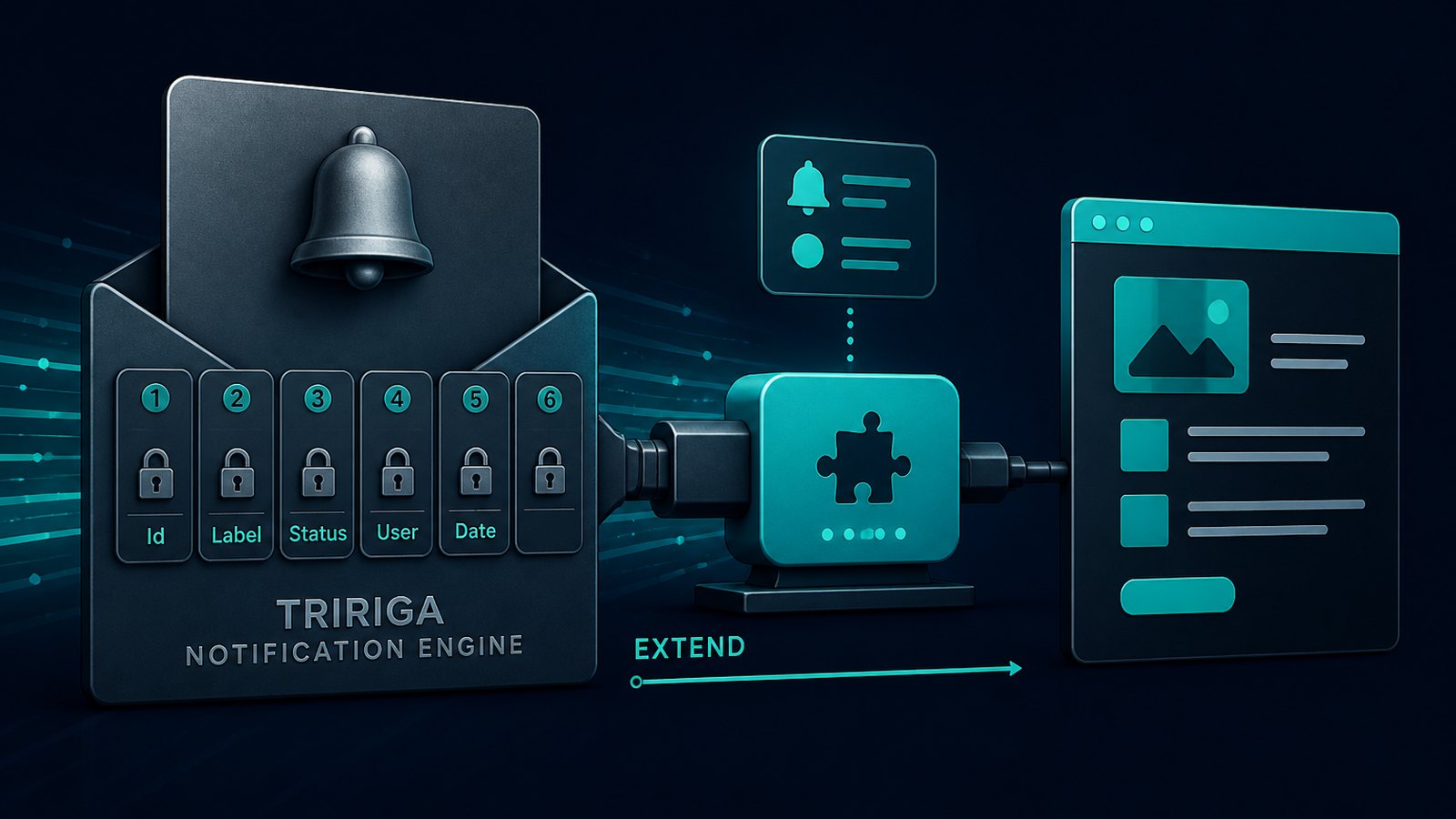
[1] Id (triIdTX) [2] Linked BO Label [3] Linked Form Label [4] Record Status (triStatusCL) [5] User that triggered status change [6] Date and Time of the status change
The second requirement is that a Notification Requirement record needs to be created for the desired BO. The notification requirement record has three required fields which must be set. The first required field is for the Linked Business Object that specifies the BO for which the notification is to be sent. The second required field is the Notification on Status field which is set to the status that the notification is desired for. The third required field is the Notification Content which specifies the Notification Content record to use for the notification.
There is a lot of power to the notification requirement record. It can be set to notify a person or a role where the role can be on any of the following objects:
Linked Record Linked Record’s Associate Geography Linked Record’s Associated Location Linked Record’s Associated Organization Linked Record’s Associated Project Submitter’s Associated Geography Submitter’s Associated Location Submitter’s Associated Organization
There are even query sections to where someone can subscribe or be excluded from the notifications. Although these queries are set to read only by default and are never set to be editable so it’s possible that that functionality does not work fully or just needs to be enabled by making the queries editable. Well at least in platform version 3.4.0, I’m not sure of other versions.
Despite all of the power in the notification engine and the notification requirement record, the hard coded substitution variables limit its effectiveness. It is this limitation that causes many people to recreate the functionality of the out of the box workflow notification engine in order to be able to use customized notification content records. This dichotomy of having to either use the static substation variables or duplicating functionality need not exist. There is a way in which in which to harness the out of the box notification engine and also be able to use custom notification content records instead of being limited to the static substitution variables. This method does require some minor modifications to a few of the out of the box workflows used by the notification engine.
Below I will document the changes that are necessary to the out of the box workflows in order to enhance the status change notification process. This methodology is also repeatable and able to be used in just those places desired, without breaking the out of the box functionality.
Enhanced Status Change Notifications
The following example will be done against the triCapitalProject BO but it may be used against any BO.
Create the following associations from the triNotifcationHelper BO in the triHelper module.
a. triHelper::triNotificationDetailHelper::Associated To
b. triRouting::triNotificationDetails:: Associated To
Create the following association from the triNotificaitonDetailHelper BO in the triHelper module.
a. triHelper::triNotificaitonHelper::Associated To
Create the following association from the triNotificationDetails BO in the triRouting module.
a. triHelper::triNotificationHelper::Associated To
Make a copy the module level status notification workflow and set it to the desired BO.
Make the following changes to the triNotificationDetailHelper – Synchronous – Send workflow.
a. Add the tasks inside of the red boxes.
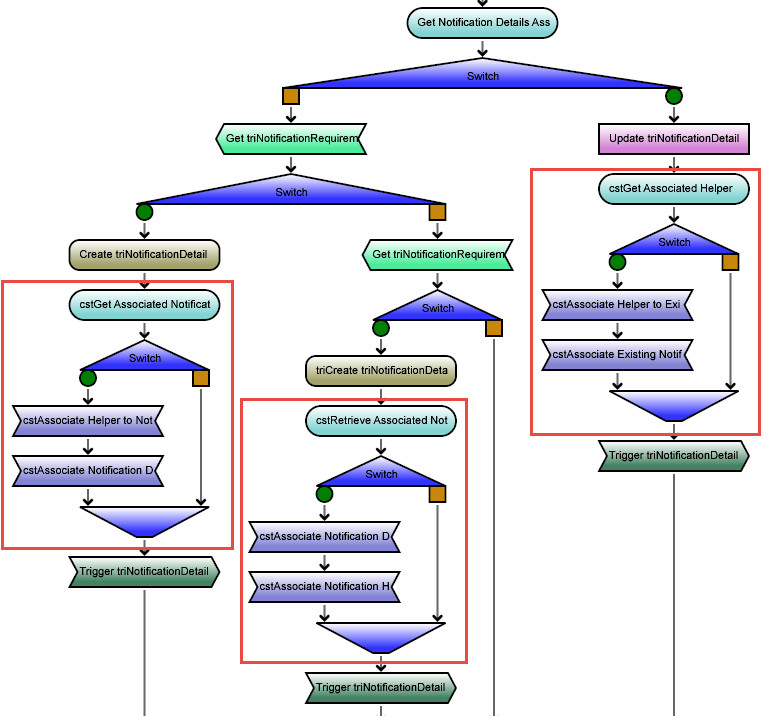
b. The two blocks immediately after the create records tasks are identical.
The retrieve record tasks retrieve the triNotificaitonHelper record that is associated to the triNotificationDetailHelper record of the Start Task using the association string of Associated To
The switch checks if the result count of the retrieve task is greater than zero.
The first Associate Records task associates the new triNotificationDetail record to the triNotificationHelper record returned by the retrieve records task.
The second Associate Records task associates the triNotificationHelper record to the triNotificationDetail record created by the Create Records task.
c. The block on the right is similar except the associate records task are to the triNotificationDetail records retrieved by the retrieve records task above the top switch.
Make the following changes to the triNotificationDetails – Synchronous – Trigger Notification Process workflow in the triRouting module.
a. The tasks prefixed cst- are out of the box tasks that have been customized and the cst prefixed tasks are new custom tasks. The switch task is also custom since there is no label to be able to tell by looking at it.
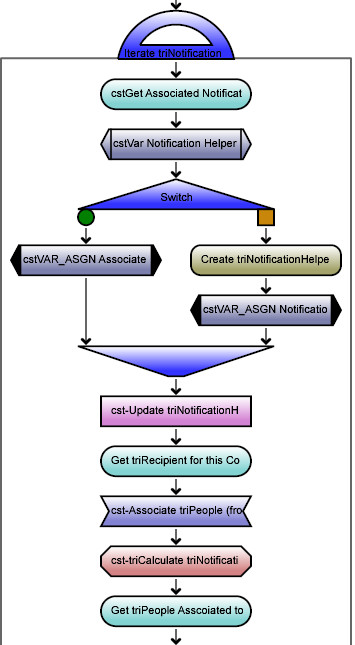
b. The custom retrieve records task at the top retrieves the triNotificationHelper record that is associated to the triNotificationDetails record (Start Task) using the association string of Associated To
c. The variable declaration task declares a variable of type triNotificationHelper .
d. The switch task checks the result count of the retrieve records task is greater than zero.
( i.) The true side of the switch assigns the triNotificationHelper record retrieved by the retrieve records task to the variable declaration task.
( ii.) The false side contains the original out of the box create records task for the triNotificationHelper record followed by a variable assignment task that assigns the newly created triNotificationHelper record to the variable declaration task.
e. The following cst- prefixed retrieve records task, associate records task, and trigger task were modified to change them from pointing to create records task to the variable declaration task instead.
The previous two workflows were dependent on the triNotificationHelper record being associated to the triNotificationDetailHelper record. The place where those records become associated is what comes next. Now that the previous steps have been completed the following steps can be repeated for each business object that needs custom status change notification messages. The rest of this example will be for triCapitalProject but can be repeated for any other desired BO.
Make a copy of the module level asynchronous workflow triProject - Associate - triStatus - Create Notification Details . It is a very simple workflow that doesn’t offer the ability to use a custom notification content record and it looks like this:
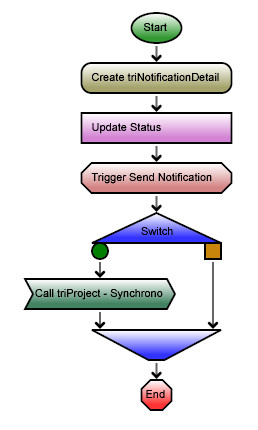
Name the copied workflow appropriately, set the object type to the triCapitalProject BO, and check the Ignore Module Workflow checkbox.
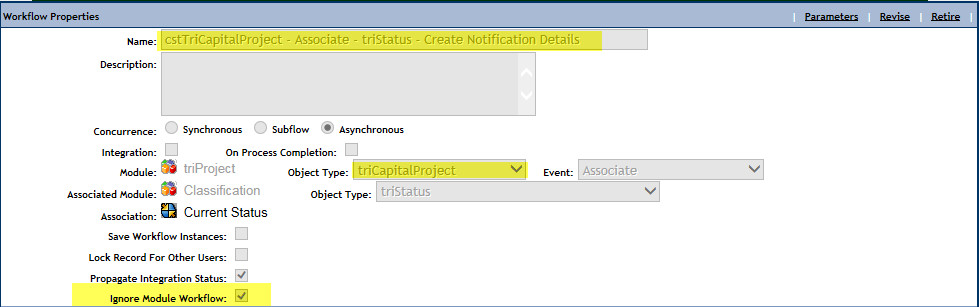
Remove any logic for other BOs in the module that exists in the workflow. In this case it will be the bottom switch and call workflow task since they pertain to the triFacilitiesProject BO and not the triCapitalProject BO.
Insert switch tasks between the modify records task and the trigger task to check If the status set on the the triNotificationDetailHelper record created by the create task matches the desired status.

On the true side of the switch add a create records task to create the triNotificationHelper record that you want to use to send the status notification and set the fields as appropriate for the notification content record that is to be used.
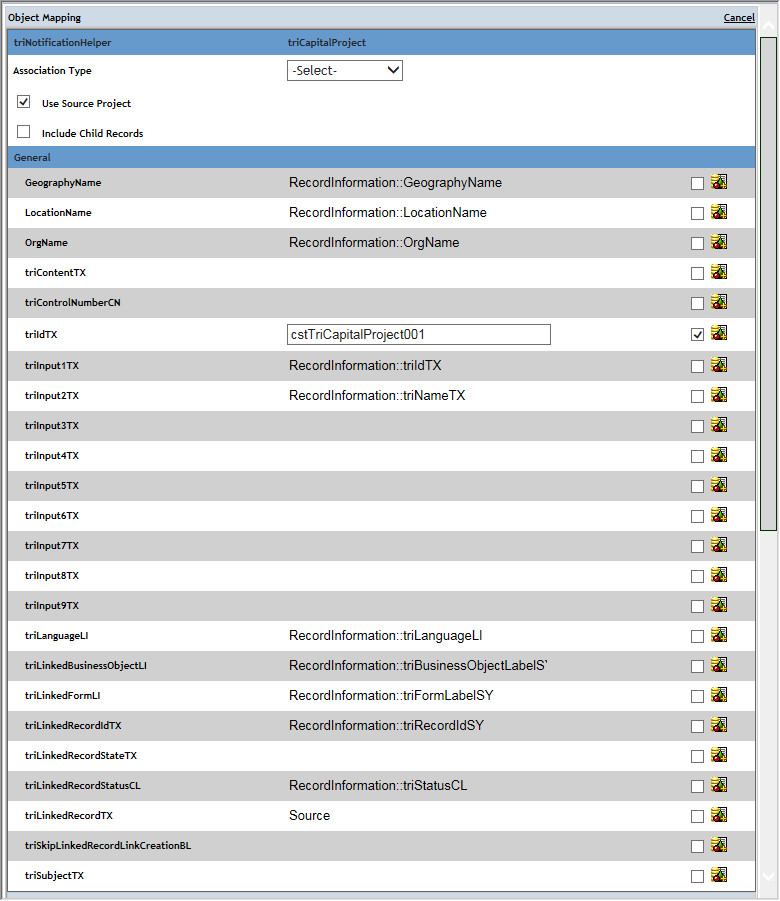
13. Add an associate records task to create an association from the triNotificationDetailHelper record to the triNotificationHelper record using the association string of Associated To.
14. Add an associate records task to create an association from the triNotificationHelper record to the triNotificationDetailHelper record using the association string of Associated To.
15. If there are notifications desired for additional status just repeat the process by adding a new switch to the false side of the original switch and follow the same logic as steps 12-14.
16. For this example we want notifications for the Active and Completed statuses, so our workflow looks as follows:
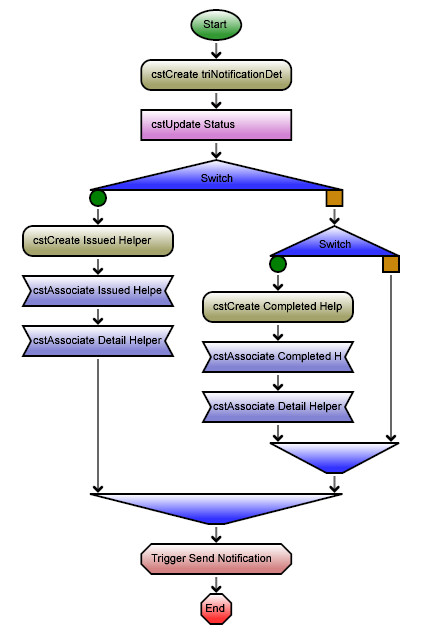
That’s all there is to it. We can now create status change notifications using custom notification content records for any BO that we want just by repeating the process of copying the module level workflow to the BO level, setting it to bypass the module level workflow, and then adding in the logic to check the status, create the notification helper, and associate it to the notification detail helper. This can all be done without having an adverse effect on the out of the box status change notifications.
Comments (0)
No comments yet.
Sign in to comment.